
FIFA 22 Mod 2027 (EA SPORTS FC 27): Download & Installation Guide
If you are still playing FIFA 22 on PC and want to completely transform it into the next generation of football gaming, downloading the FIFA 22 Mod 2027 (EA FC 27 Edition) is an absolute necessity. Consequently, this massive overhaul converts FIFA 22 into EA SPORTS FC 27, bringing full 2026/2027 season updates. For instance, it features updated summer transfers, official 2026/2027 kits, high-definition player faces, modern FC 27 user interfaces, scoreboards, FIFA World Cup 2026 assets, and enhanced pitch graphics.
In this comprehensive guide, you will find the complete feature list, direct download links (All 4 Parts, Mod Manager, and Squads file), system requirements, and step-by-step installation instructions using FIFA Mod Manager.
📺 Watch FIFA 22 to EA FC 27 Mod Gameplay & Showcase
Watch the official video presentation below to explore the new EA SPORTS FC 27 menus, updated scoreboards, 2026/2027 season kits, and HD player face models before downloading:
What is FIFA 22 Mod 2027 (EA FC 27 Edition)?
The FIFA 22 Mod 2027 is a comprehensive fan-made modification designed for PC players who wish to enjoy the latest 2026/2027 football season without needing a brand-new high-end system for recent titles.
By leveraging the solid foundation and smooth performance of FIFA 22, this mod injects modern database updates, redesigned graphic themes inspired by EA SPORTS FC 27, updated team logos, authentic league adboards, and realistic player attributes into the game. Additionally, if you also enjoy playing classic Konami football titles on PC with full 2027 season upgrades, make sure to check out our complete PES 2017 RZ Patch 2027 AIO Download & Installation Guide.
Key Features of FIFA 22 Mod 2027
This complete patch updates every core element of FIFA 22 to match modern football standards:
1. Full 2026/2027 Summer Transfers & Rosters
First and foremost, the squad database includes all major real-world summer transfers for the 2026/2027 season across Europe’s top leagues, including the Premier League, La Liga, Serie A, Bundesliga, and Ligue 1. Squad numbers, starting lineups, and manager assignments have also been fully updated.
2. EA SPORTS FC 27 Menus & UI Theme
Additionally, the original FIFA 22 user interface is replaced with sleek, modern EA SPORTS FC 27 theme graphics, featuring vibrant neon accent lighting, modern pause menus, custom start screens, and fresh background visuals.
3. Official 2026/2027 Season Kits & Sleeve Badges
Furthermore, the patch adds high-definition home, away, third, and goalkeeper kits for top European clubs and national teams. As a result, these kits include authentic sleeve badges, sponsor logos, and updated typography for the 2026/2027 campaign.
4. HD Player Faces & Realistic Tattoos
Moreover, thousands of players receive updated high-definition face scans, modern hairstyles, realistic skin textures, and body tattoos. Consequently, rising stars and newly transferred players now possess accurate visual likenesses.
5. FC 26 & FC 27 Scoreboards & Adboards
To elevate match presentation, the mod includes authentic TV broadcast scoreboards for major competitions. In addition, it features dynamic LED perimeter adboards, official match balls (including the 2026 World Cup match ball), and custom referee kits.
6. Career Mode 2026–2027 Enhancements
Finally, the update offers optimized start-year scripts for Career Mode, enabling you to begin your managerial or player campaign directly in the 2026/2027 season with updated tournament structures and balanced transfer budgets.
FIFA 22 Mod 2027 Minimum & Recommended System Requirements
Since the modification relies on the core FIFA 22 engine, it remains lightweight and highly accessible. Below are the hardware specifications needed to run the mod efficiently:
- Operating System: Windows 10 / 11 (64-Bit)
- Processor (CPU): Intel Core i5-3550 @ 3.40GHz or AMD FX-8150 @ 3.6GHz
- Memory (RAM): 8 GB RAM
- Graphics Card (GPU): NVIDIA GeForce GTX 1050 Ti or AMD Radeon R9 270X (2 GB VRAM minimum)
- DirectX: Version 12
- Storage: 50 GB free disk space
FIFA 22 Mod 2027 System Performance
Running FIFA 22 with this modification remains smooth and accessible for most PC setups. Because the base engine remains FIFA 22, players can enjoy 60+ FPS gameplay even on mid-range GPUs such as the NVIDIA GeForce GTX 1060 or GTX 1080.
However, if you experience minor framerate drops during match intros due to heavy HD face packs or 4K turf textures, you can easily adjust your in-game graphics settings or disable specific optional cosmetic modules inside FIFA Mod Manager.
FIFA 22 Mod 2027 Direct Download Links
Make sure to download all required parts and utility tools before proceeding with the extraction and setup.
1. Original FIFA 22 Base Game
If you do not have a clean copy of the base game installed, obtain the original release here:
2. Main Mod Files (FIFA 22 Mod 2027)
To begin, get all 4 RAR parts into the same folder before extracting Part 1:
3. Required Utilities (Mod Manager & Squads)
In addition, download the essential software utilities to manage and activate the patch files:
How to Install FIFA 22 Mod 2027
Follow these step-by-step instructions carefully to ensure a successful installation:
- Extract Mod Archives: To begin, place all 4 downloaded parts of
FIFA 22 Mod 2027in one folder, right-clickPart 1, and select Extract Here using WinRAR or 7-Zip. - Install Squad File: Next, extract
Squad-2026-09-01.zipand copy the extracted file directly into your local settings folder:Documents\FIFA 22\settings. - Launch FIFA Mod Manager: Afterward, open
FIFA Mod Manager.exeas Administrator. If prompted, locate your main game executable (FIFA22.exe). - Import Mod Files: Inside the tool interface, click Import Mod(s), navigate to your extracted mod folder, select all
.fifamodfiles, and click Open.
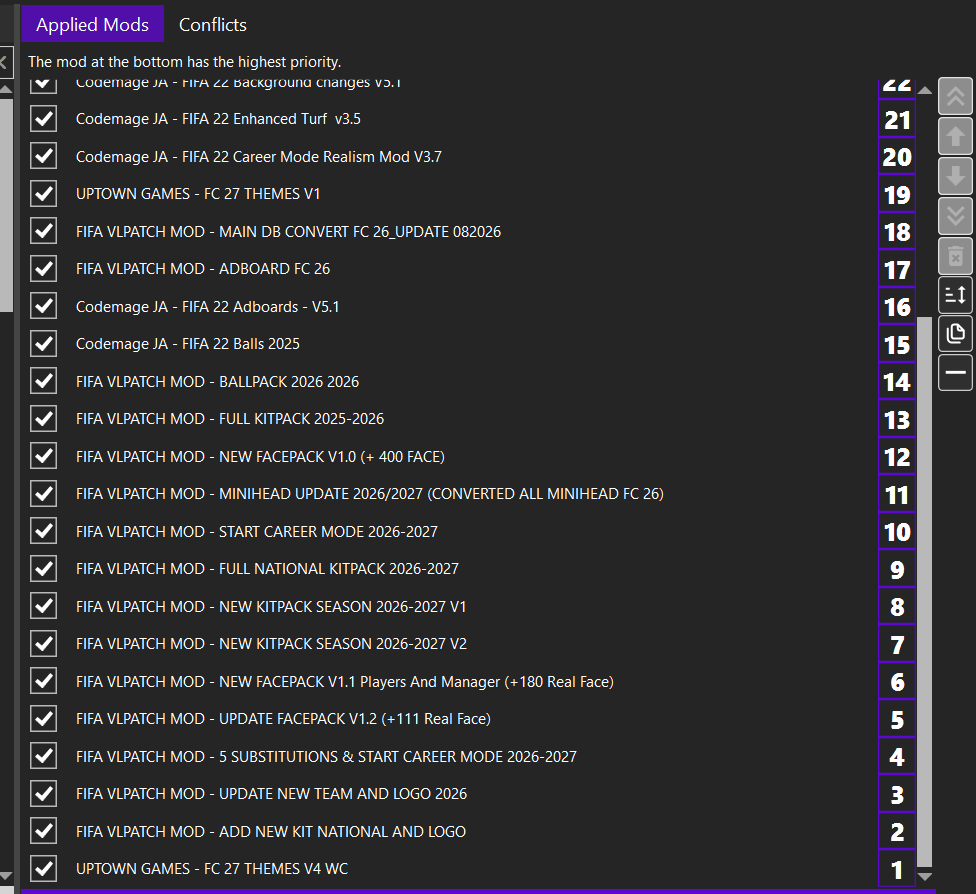
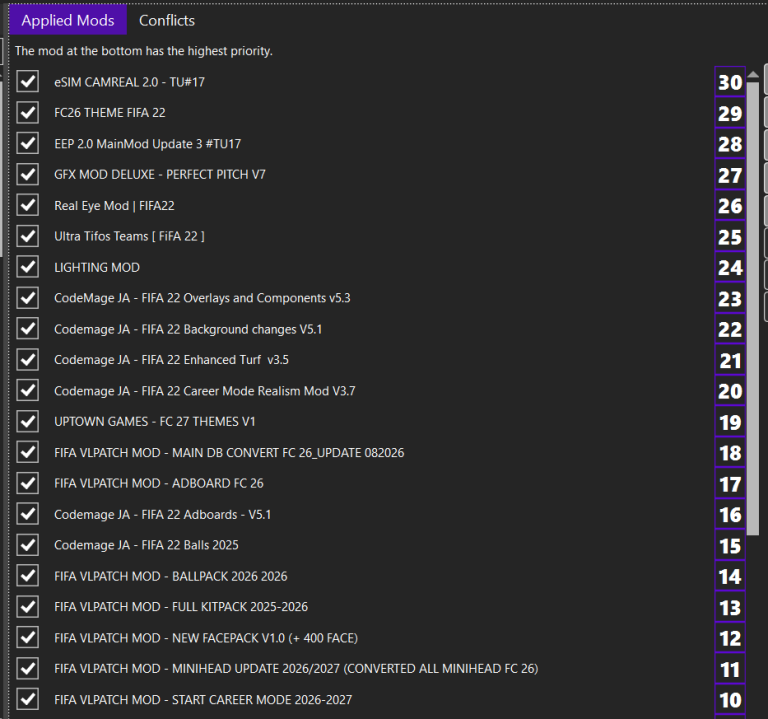
- Apply Mods in Correct Order: Subsequently, double-click the imported mods to move them to the Applied Mods panel on the right. Ensure the priority order matches the official release instructions (mods at the bottom hold the highest priority).
- Launch Game: Once applied, click the green Launch button in FIFA Mod Manager and wait for the tool to compile the
ModDatadirectory. - Load Squads In-Game: Finally, after reaching the main menu, navigate to Customize > Profile > Load Squads, select
Squads20260901120338, and apply it.
FIFA 22 Mod 2027 Frequently Asked Questions
Do I need a clean version of FIFA 22 to install this mod?
Yes, starting with a clean, unmodded FIFA 22 installation is highly recommended. Because leftover files can cause database mismatches, this prevents sudden desktop crashes during loading screens.
What should I do if FIFA Mod Manager displays a “Different Game Version” warning?
Fortunately, you can safely ignore this warning. Simply click OK when prompted, as older .fifamod asset files remain fully functional with the latest FIFA 22 updates.
Why are the new transfers not showing up in my game?
Usually, this occurs when squad files are not properly loaded. Make sure you pasted the squad file into Documents\FIFA 22\settings and manually loaded it inside the game via Customize > Profile > Load Squads.
Final Verdict
Overall, the FIFA 22 Mod 2027 (EA FC 27 Edition) is the ultimate update for PC gamers looking to experience the 2026/2027 season without buying a new title. By uniting EA FC 27 graphic presentation, updated 2026/2027 summer transfers, and HD faces with the optimized FIFA 22 engine, this release delivers a complete next-gen football experience.
Buenas tardes
Bro hice todos los pasos y solo me falta el archivo que esta en la posicion 2, ADD NEW KIT NATIONAL, ese no lo encuentro, me pdorias apoyar
Mil gracias
Hola: Puedes ejecutar el mod normalmente sin él.