PES 6 Patch World Cup Download and Install for PC
Looking for the PES 6 World Cup 2026 Patch PC download? This complete guide explains how to download, extract, install, and run the PES 6 World Cup 2026 Patch on a Windows PC.
The patch brings modern international football content to the classic Pro Evolution Soccer 6 engine. It includes 48 national teams, updated 26-man squads, World Cup stadiums, official tournament match balls, custom goal songs, HD crowd graphics, modern boots, and updated broadcast features.
As a result, fans of classic PES 6 can enjoy a refreshed World Cup experience while keeping the familiar gameplay that made the original game so popular.

PES 6 World Cup 2026 Patch featuring updated squads, realistic stadiums, HD crowds, and modern matchday graphics.
Quick Summary: PES 6 World Cup 2026 Patch
Before downloading the mod, here is a quick overview of what the PES 6 World Cup 2026 Patch offers:
- Platform: PC exclusive with Windows 10 and Windows 11 support.
- Base Game: Independent installation; the original PES 6 installation is not required according to the supplied package information.
- File Size: Approximately 5.3 GB after extraction.
- Commentary: 10 selectable commentary profiles.
- Teams: 48 FIFA World Cup 2026 participating national teams.
- Stadiums: 15 of the 16 official World Cup venues, with KONAMI stadiums used as fallbacks.
- Graphics: HD crowd textures, updated kits, modern boots, and tournament graphics.
- Audio: Custom national goal songs and multiple commentary options.
Why PES 6 World Cup 2026 Patch Is Popular With Retro Football Fans
Pro Evolution Soccer 6 was released in 2006, but its gameplay continues to attract football fans and retro gaming enthusiasts. The combination of responsive controls, physical gameplay, and a simple but rewarding learning curve has helped the game remain popular long after its original release.
Much of that longevity comes from the dedicated PES modding community. Independent creators continue to update the classic game with modern teams, kits, stadiums, graphics, audio, and other football content.
The PES 6 World Cup 2026 Patch continues that tradition by combining the classic PES 6 gameplay experience with modern international football content.
Instead of replacing the original gameplay concept, the patch focuses on updating the overall presentation. Therefore, players can experience a modern World Cup atmosphere while still enjoying the familiar PES 6 engine.
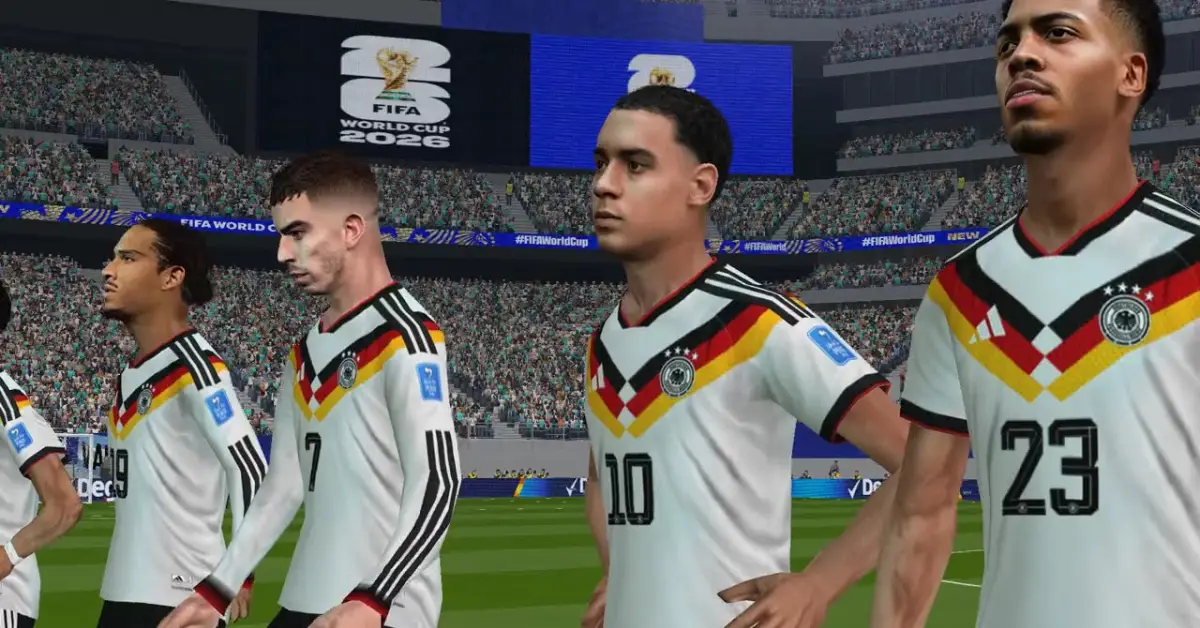
PES 6 World Cup 2026 Patch gameplay featuring upgraded kits, player graphics, and classic match physics.
Key Features of PES 6 World Cup 2026 Patch
The PES 6 World Cup 2026 Patch is designed as a complete modern football package for the classic PES 6 engine. Here are the main features included in the release.
1. 48 World Cup Teams and Updated Squads
The patch includes all 48 national teams participating in the 2026 World Cup. Each team features an updated 26-man squad with player positions, ratings, and tactical formations.
In addition, the package includes updated national team kits and customized player visuals. Starting XI players also feature high-fidelity 3D face builds and updated goalkeeper equipment.
These changes give the classic game a much more modern international football presentation.
2. Official Trionda and Trionda Final Match Balls
Match presentation is another important part of the update. The PES 6 World Cup 2026 Patch includes the Trionda and Trionda Final match balls.
Furthermore, the graphics package adds a modern boot collection featuring contemporary designs and pink color schemes. These additions help bring the visual style of modern football into the classic PES 6 environment.
3. World Cup Stadiums and Authentic Match Atmosphere
The patch includes 15 of the 16 official World Cup stadiums. Each recreated venue is designed to provide a more authentic tournament atmosphere inside the PES 6 graphics engine.
The Philadelphia stadium is not included as a custom recreation. Instead, the package provides default KONAMI stadiums with tournament-themed adboards as fallback options.
Beyond the stadiums, the patch also adds national goal songs. Consequently, players can hear customized audio when their selected team scores during a match.
4. Custom Scoreboards and TV Broadcast Overlays
Broadcast presentation has also received a major update. Players can choose from clean scoreboard options or select from 20 different real-world TV broadcast overlays.
Additionally, the package includes updated referee kits and cup presentation graphics. Together, these elements help create a more complete tournament-style match presentation.
5. 10-in-1 Commentary Selector
The included commentary selector makes it easier to change the match commentary before launching the game.
With 10 selectable commentary options, players can choose their preferred audio profile and then start the game. This feature is particularly useful for anyone who wants to change the commentary experience between different play sessions.
PES 6 World Cup 2026 Patch Features at a Glance
| Feature | Details |
|---|---|
| Installation Type | Independent installation |
| Original PES 6 Required | No, according to the supplied package information |
| Extracted File Size | Approximately 5.3 GB |
| National Teams | 48 teams with updated 26-man squads |
| World Cup Stadiums | 15 recreated venues plus KONAMI fallback stadiums |
| Commentary | 10 selectable commentary options |
| Scoreboards | 20 broadcast styles plus clean options |
| Match Balls | Trionda and Trionda Final |
| Graphics | HD crowd textures, updated kits, boots, and stadium graphics |
PES 6 World Cup 2026 Patch Download
Before starting the installation, download all three main archive parts. Make sure Part 1, Part 2, and Part 3 are saved in the same folder before you begin extracting the game.
Main PES 6 World Cup 2026 Download
Download each of the following archive parts using the direct download links below:
Important: All three parts are required to extract the complete game package. Keep them together in the same directory before starting the extraction process.
Optional HD Crowd Atmosphere Pack
If you want improved spectator graphics, an optional HD Crowd package is also available. This addon provides high-definition crowd textures for a more detailed stadium atmosphere.
How to Install PES 6 World Cup 2026 Patch on PC
The supplied package is described as an independent installation. That means you can follow the included setup without installing the original PES 6 game first.
Follow the steps below carefully to extract the archive and launch the game.
Step 1: Create a Folder for the PES 6 World Cup 2026 Patch
- Create a new folder anywhere on your PC.
- Name the folder
PES 6 World Cup 2026. - Place
Part 1,Part 2, andPart 3inside the same folder.
Keeping all archive parts together is important because the multi-part archive needs access to the other files during extraction.
Step 2: Extract the Main Game Files
- Locate PES 6 World Cup 2026.part1.rar.
- Right-click the file.
- Select Extract Here using WinRAR or 7-Zip.
- Wait for the extraction process to finish.
There is no need to manually extract Part 2 and Part 3 separately when using a compatible archive program. The extraction process should read the additional archive parts automatically when they are stored in the same directory.
After extraction, the complete game package should require approximately 5.3 GB of disk space.
Step 3: Install the Optional HD Crowd Addon
The HD Crowd package is optional, so you can skip this step if you prefer the standard graphics.
- Download the
HD Crowd - PES 6 World Cup 2026.rararchive. - Extract the contents using WinRAR or 7-Zip.
- Open the extracted graphics folder.
- Copy the required files into your main PES 6 folder.
- When Windows asks whether you want to replace existing files, select Replace existing files.
Once the files have been copied, the HD Crowd textures should be available when you launch the game.
Step 4: Configure PES6.exe Compatibility
- Open the main PES 6 World Cup 2026 game folder.
- Locate PES6.exe.
- Right-click PES6.exe and select Properties.
- Open the Compatibility tab.
- Enable Run this program as an administrator.
- Click Apply and then OK.
Step 5: Select Commentary and Launch the Game
Before starting your first match, open the included commentary selector tool. Choose one of the available commentary profiles and then launch PES6.exe.
After that, the World Cup 2026 Patch should start with your selected commentary option.
PES 6 World Cup 2026 System Requirements
The supplied package lists the following minimum PC requirements:
| Requirement | Minimum Specification |
|---|---|
| Operating System | Windows 7, Windows 8.1, Windows 10, or Windows 11 (64-bit) |
| Processor | Intel Core 2 Duo E8400 / AMD Athlon 64 X2 6000+ or higher |
| RAM | 2 GB minimum; 4 GB recommended for HD Crowd textures |
| Graphics Card | NVIDIA GeForce GT 730 / AMD Radeon R7 240 or equivalent |
| DirectX | DirectX 9.0c support |
| Storage | At least 6 GB of available hard drive space |
Frequently Asked Questions About PES 6 World Cup 2026 Patch
Do I need the original PES 6 game installed?
No. According to the supplied package information, this release is designed as an independent installation. Therefore, the original PES 6 installation is not required for this package.
How many teams are included in the PES 6 World Cup 2026 Patch?
The patch includes 48 national teams participating in the 2026 World Cup. The teams also receive updated 26-man squads, player positions, ratings, and tactical formations.
Which World Cup stadiums are included?
The package includes 15 of the 16 official World Cup venues. The supplied package does not recreate the Philadelphia venue. Instead, default KONAMI stadiums with tournament-themed adboards are provided as fallback options.
How do I change the commentary language?
Firstly, open the main PES 6 game folder and launch the included commentary selector tool. You can then choose from the available commentary profiles before starting the game.
Do you need the HD Crowd addon?
However, the HD Crowd package is an optional addon. Install the HD Crowd package if you want enhanced spectator textures; the main PES 6 World Cup 2026 package works without it.
How much storage space does the patch need?
Additionally, the extracted game package requires approximately 5.3 GB. However, the listed system requirements recommend having at least 6 GB of free storage space available.
Can I play PES 6 World Cup 2026 on Windows 10 and Windows 11?
Yes. The supplied package information lists Windows 10 and Windows 11 among the supported operating systems.
Final Verdict: Is PES 6 World Cup 2026 Patch Worth Installing?
The PES 6 World Cup 2026 Patch offers a substantial modernization of the classic PES 6 experience. Instead of changing the foundation of the game, it focuses on bringing updated international football content to the familiar 2006 engine.
With 48 national teams, updated squads, World Cup stadiums, Trionda match balls, custom goal songs, modern boots, broadcast overlays, and selectable commentary, the package provides plenty of new content for retro football fans.
Installation is also straightforward. Download the three archive parts, keep them in the same folder, extract Part 1, optionally install the HD Crowd addon, configure PES6.exe, and launch the game.
Overall, the PES 6 World Cup 2026 Patch is a strong choice for players who want to experience modern international football through the classic PES 6 engine.
If you enjoy other classic PES mods, you can also check out these related guides: