How to Download and Install PES 2017 RZ Patch 2027 AIO Update V8
Looking for how to install RZ Patch 2027 PES 2017 on PC? This complete guide covers everything you need to install the PES 2017 RZ Patch 2027 AIO Update V8, apply the latest PES 2017 2027 Squad Update V8, install EDIT00000000, generate the required DpFileList.bin, and verify the updated 2027 squads, new kits, and latest transfers. Furthermore, if you are also playing classic PES titles on low-end hardware, check out our comprehensive PES 2013 Patch 2027 AIO: Download & Installation Guide.
For the best results, start with a clean, unmodded version of PES 2017. Consequently, following every step in the correct order ensures your game stays completely free of database crashes or visual glitches.
Quick Summary: How to Install RZ Patch 2027 PES 2017
- Start with: A clean, unmodded PES 2017 installation.
- Download: The base game, all 10 parts of the 2027 AIO files, and updates up to Update V8.
- Extract: Put all AIO parts in one folder and extract Part 1 using WinRAR.
- Clean: Delete existing game files while preserving the main
Datafolder. - Copy: Paste the extracted patch files into the PES 2017 directory.
- Install Edit File: Copy
EDIT00000000into the save folder. - Generate: Use PES 2017 DpFileList Generator to include all update CPKs and create a new
DpFileList.bin. - Verify: Launch the game as administrator and check the 2027 squads, V8 kits, and transfers.
What’s New in PES 2017 RZ Patch 2027 Update V8
The latest Update V8 brings extensive summer database refinements, brand-new 2026/2027 kitpacks, and fresh player additions to keep your game running at maximum realism.
Update V8 Key Features
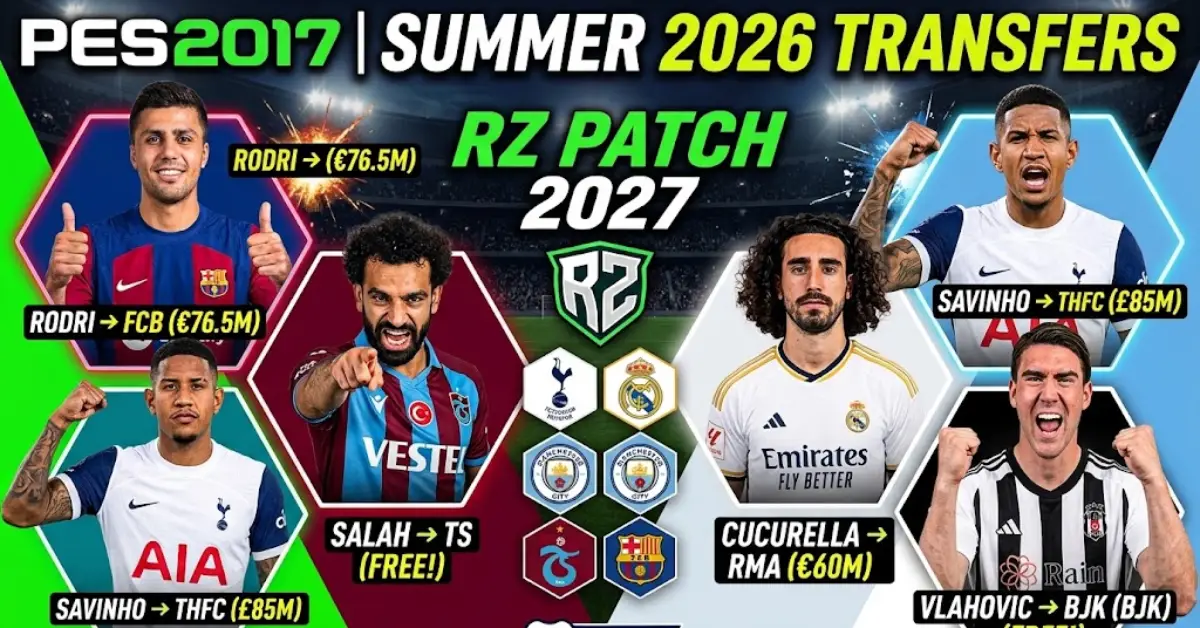
- Latest Summer Transfers: Roster and transfer updates up to August 12, 2026.
- New Player Database additions: Added numerous new stars and young upcoming talents.
- Visual Upgrades: Updated real player faces and fresh minifaces.
- Refreshed Ratings: Overall player rating adjustments based on performance.
- Club Branding Updates: Updated logos for Isenmulang FC & Java United.
- Full 2026/2027 Kitpack V8 Integration: High-definition official kits across top leagues.
Official Update V8 Kits List
- Premier League: Arsenal (Home, Away, GK), Aston Villa (Home, GK), Chelsea (Home, Away, GK), Liverpool (Home, Away, GK), Manchester City (Home, Away, GK), Manchester United (Home, Away, GK), Newcastle (Home, Away, GK), Leeds United (Home, Away, GK).
- Ligue 1: PSG (Home, Away).
- Serie A: Inter Milan (Home, GK), Juventus (Home, Away), Napoli (Away).
- La Liga: Atletico Madrid (Home, Away, GK), Barcelona (Home, Away, GK), Real Madrid (Home, Away, GK), Real Betis (Home, Away, GK), Racing Santander (Home, Away, GK), Deportivo La Coruña (Home, Away, GK), Athletic Bilbao (Home, Away, GK), Villarreal (Home, Away, GK).
- Eredivisie: Ajax (Home, 3rd).
- Bundesliga: Bayern München (Home), Borussia Dortmund (Home).
- Süper Lig: Trabzonspor (Home, Away, GK).
- Saudi Pro League: Al Nassr (Home).
Download RZ Patch 2027 PES 2017 – AIO, Game & Updates
Before starting the setup process, download the required archives listed below. Specifically, this section includes the base game, the full RZ 27 Patch AIO 2027, and all sequential official update packages (V1 to V8).
PES 2017 Game Download
Download the PES 2017 game archive if you need a fresh installation. For instance, players migrating from other mod packages should perform a completely clean reinstallation first.
RZ 27 Patch AIO 2027 – 10 Parts
Download all 10 parts of the complete AIO build. However, make sure to place every archive part into the same folder before extracting Part 1 with WinRAR.
Important: All 10 parts are required for the full mod package. Therefore, do not attempt to extract the archive parts individually.
- Download RZ 27 Patch AIO 2027 – Part 1
- Download RZ 27 Patch AIO 2027 – Part 2
- Download RZ 27 Patch AIO 2027 – Part 3
- Download RZ 27 Patch AIO 2027 – Part 4
- Download RZ 27 Patch AIO 2027 – Part 5
- Download RZ 27 Patch AIO 2027 – Part 6
- Download RZ 27 Patch AIO 2027 – Part 7
- Download RZ 27 Patch AIO 2027 – Part 8
- Download RZ 27 Patch AIO 2027 – Part 9
- Download RZ 27 Patch AIO 2027 – Part 10
RZ 27 Patch 2027 Official Updates (V1 to V8)
If you already have the primary files installed, you can apply these sequential update packages to keep your database current with the latest V8 release.
- Download RZ 27 Update V1.rar
- Download RZ 27 Update V2.rar
- Download RZ 27 Update V3.rar
- Download RZ 27 Update V4.rar
- Download RZ 27 Update V5.rar
- Download RZ 27 Update V6.rar
- Download RZ 27 Update V7.rar
- Download RZ 27 Update V8.rar
Download Note: In order to complete a fresh installation, keep all downloaded files in one place and unpack only Part 1. Additionally, if you enjoy retro football setups on legacy PCs, check out our guide on PES 2013 2026/2027 season updates.
What You Need Before Installing RZ Patch 2027
Prior to launching the setup procedure, ensure that your computer meets all basic prerequisites:
- A clean, unmodded copy of Pro Evolution Soccer 2017.
- All 10 parts of the RZ 27 Patch All-In-One (AIO) package.
- All update packages including RZ 27 Update V8.rar.
- WinRAR or 7-Zip file extraction software.
- The updated Option File / Edit File (included in V8).
- The official PES2017 DpFileList Generator.exe tool.
- Administrative access on Windows.
Important: Remember to exit the game entirely before editing system files. As a result, file corruption can be easily avoided.
Step 1: Download and Extract the PES 2017 RZ Patch 2027 AIO
The initial phase in how to install RZ Patch 2027 PES 2017 involves extracting the multipart archives correctly.
- Download all 10 parts of the 2027 AIO package.
- Create a single dedicated folder for these archive files.
- Move all 10 parts into this exact directory.
- Locate Part 1.
- Right-click Part 1 and select Extract Here using WinRAR.
- Wait while the software processes the multi-part archive.
Once extraction finishes, you will see a main folder containing all necessary assets for the update.
Warning: Never separate archive parts into different directories. Instead, keep them together so WinRAR can read the complete sequence automatically.
Step 2: Clean Your Existing PES 2017 Folder
Before moving the new modification files, clean your main directory. Consequently, leftover files from older patches will not conflict with the 2027 update build.
Depending on your system setup, navigate to your root folder:
C:\Program Files (x86)\Pro Evolution Soccer 2017
or:
C:\Program Files\Pro Evolution Soccer 2017
Clean the PES 2017 Installation Directory
- Open the main installation folder.
- Select all files and directories inside.
- Delete these selected items.
- Keep the main
Datafolder untouched.
Critical Warning: Do not delete the core Data folder under any circumstances, because it holds fundamental game files essential for stability.
Step 3: Copy the RZ Patch 2027 Files & Apply Updates V1 to V8
After cleaning out unnecessary files, copy the newly extracted modification items directly into your game directory.
- Open the extracted AIO folder.
- Select all files and subfolders inside, click Copy, and paste them into your main Pro Evolution Soccer 2017 root directory.
- Extract update files V1 through V8 separately.
- Copy the
.cpkfiles from each update package into your PES 2017downloadfolder. - When prompted by Windows, choose Replace the files in the destination.
Wait patiently until all items transfer completely before taking the next step.
Step 4: Install EDIT00000000 for the PES 2017 2027 Squad Update
Next, you must apply the custom database. The EDIT00000000 PES 2017 file configures accurate 2027 transfers, tactics, and team structures up to August 12, 2026 across all leagues.
Locate and Copy EDIT00000000
- Open the extracted Update V8 setup folder.
- Open the Option File or Edit File subfolder.
- Highlight
EDIT00000000and copy it.
Open the Save Directory
Next, open your system save location:
Documents\KONAMI\Pro Evolution Soccer 2017\save
- Open this
savedirectory. - Paste your copied
EDIT00000000file inside. - Confirm by clicking Replace when asked.
Why is EDIT00000000 important? This edit file overwrites default database values. Thus, updated player rosters, young player additions, and modern formations load seamlessly in-game.
Step 5: Generate DpFileList.bin for RZ Patch & Update V8
Another crucial stage is generating a revised DpFileList.bin. This file instructs the game engine on how to sequence and load all .cpk graphic and kit packs up to Update V8.
Open PES2017 DpFileList Generator
- Go to your game installation root directory.
- Open the
downloadsubfolder. - Find PES2017 DpFileList Generator.exe.
- Right-click the application icon.
- Choose Run as administrator.
Configure the Generator Tool
- CPK Path: Point this parameter directly to the
downloadfolder. - DpFileList.bin Path: Target the current
DpFileList.binfile in that same folder. - DLC: Choose No DLC (or select your installed DLC version).
- CPK Files: Mark all newly added
.cpkentries (ensuring Update V8 CPKs are checked).
Generate the New DpFileList.bin
- Verify your CPK Path configuration.
- Ensure your output file destination is correct.
- Check all listed modification CPK items.
- Set the DLC drop-down menu properly.
- Click Generate DpFileList.bin.
- Wait for the confirmation popup window.
Important: Skip this step, and your new V8 kits and player faces will fail to render properly. Therefore, always execute this tool after adding new CPK files.
Step 6: Launch PES 2017 and Verify RZ Patch 2027
Once you finish adjusting files and generating your bin sequence, launch the application to confirm everything functions properly.
- Navigate to the game folder.
- Right-click the game shortcut and run as administrator.
- Allow the menu to load completely.
- Navigate straight to the Edit mode.
- Inspect team lineups, ratings, and August 2026 transfers.
- Check modern competition presentation graphics and new V8 kitpacks.
Installation Complete: If modern team rosters and updated kits load inside Edit Mode, your installation has succeeded and is fully ready to play.
RZ Patch 2027 PES 2017 Installation Checklist
- Base game: Clean PES 2017 directory prepared.
- AIO files: All 10 multi-part archives acquired.
- Updates acquired: Sequential update files V1 through V8 downloaded.
- Extraction: Part 1 unpacked via WinRAR.
- Cleaned folder: Old files cleared while holding the
Datafolder intact. - Pasted assets: Modification contents and V8 CPKs moved to the primary game folder.
- Edit File: Latest V8
EDIT00000000placed into system Documents. - CPK Selection: All assets and update CPKs marked inside DpFileList tool.
- Bin generated: Revised
DpFileList.binsuccessfully compiled. - Game launched: Application run under administrator mode.
- Verified: Rosters, V8 kitpacks, and faces confirmed in Edit Mode.
Common RZ Patch 2027 PES 2017 Installation Problems
Patch or Update V8 content is not showing in PES 2017
Re-examine your DpFileList.bin file. Open the generator tool using administrative privileges and check whether the CPK path points to your actual download folder. Afterward, check all CPKs (including V8) again and regenerate the file.
The latest 2026/2027 transfers or young players are missing
Verify that your EDIT00000000 file from Update V8 sits in the correct system location:
Documents\KONAMI\Pro Evolution Soccer 2017\save
If missing, overwrite the existing file and restart your game session.
PES 2017 is not loading the new patch correctly
This issue typically occurs when installing over an existing modded setup. For that reason, clean out old modifications completely while preserving your base Data folder, then repeat the copy process.
DpFileList Generator cannot find the CPK files
Ensure all extra .cpk archives sit inside the download folder. Furthermore, double-check that your generator path configuration matches that folder path exactly.
Frequently Asked Questions About RZ Patch 2027 PES 2017
How do I install RZ Patch 2027 PES 2017 from the AIO files and Update V8?
First, download all 10 archive parts and updates V1-V8 into one folder. Next, extract Part 1, clean your game directory while saving the Data folder, paste the new files and update CPKs, copy the V8 EDIT00000000 to your save location, compile a new DpFileList.bin, and run the game as administrator.
Where should I put EDIT00000000 in PES 2017?
Place your EDIT00000000 database file directly into:
Documents\KONAMI\Pro Evolution Soccer 2017\save
Remember to select replace when Windows asks to confirm the file transfer.
How do I use DpFileList Generator for PES 2017 RZ Patch 2027 Update V8?
Launch PES2017 DpFileList Generator.exe as administrator from your download folder. Next, choose your CPK directory path, mark all update entries including V8, set your DLC option, and click Generate DpFileList.bin.
Why are the PES 2017 2027 Update V8 kits and squads not showing after installing RZ Patch?
This usually happens because the V8 edit file was not placed correctly into the Documents save folder, or because the new V8 CPK files were not registered inside DpFileList.bin. Re-verify both steps to resolve the problem quickly.
Conclusion
Now you know how to install RZ Patch 2027 PES 2017 along with Update V8 from start to finish. Overall, the installation process requires preparing a clean base game, downloading the multi-part PES 2017 RZ Patch 2027 AIO package, and extracting the contents carefully.
After cleaning your primary folder while preserving your core Data files, transfer the modification assets and V8 update files over. Subsequently, install your updated EDIT00000000 file to load the latest transfers up to August 12, 2026, build your DpFileList.bin, and run your game with administrative privileges.
Finally, inspect your database inside Edit Mode to verify team rosters, new young players, and updated 2027 kitpacks. For players interested in testing modern updates on classic gaming setups, feel free to read our step-by-step guide on installing the PES 2013 Patch 2027 AIO update for PC.